|
If you are using a version of Voyager prior to 6.0.08.22, you update the performance tables by using the NCREIF Update Function screen. For more information, see “Updating NCREIF Performance Tables with the G/L Update Function”.
|
For information about updating the fifth NCREIF performance table (NCREIF Property Data) with property data, see “Updating the Property Data Performance Table”.
|
1
|
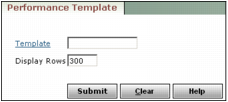
From the side menu, select Performance > Transfer From G/L > Add/Review Performance Template. The Performance Template filter appears.
|
|
2
|
Leave the Template field empty, and then click Submit. The Performance Template Setup screen appears.
|
|
3
|
Click New. The screen changes to edit mode.
|
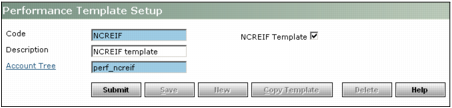
Code Type a unique code for the template.
Description Type a brief description of the template.
Account Tree Type or select the account tree that you want to link to the template.
NCREIF Template Select this check box if you want Voyager to automatically complete the Performance Table and Performance Field fields with the appropriate data. These fields are displayed as read-only data on the Performance Template Setup screen after you click Submit.
|
5
|
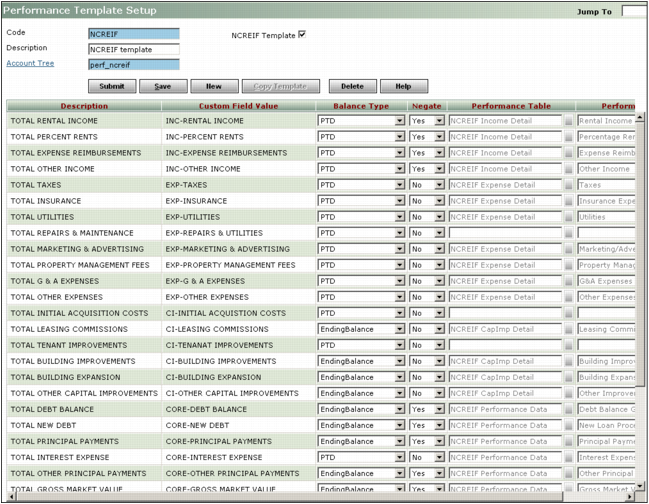
Balance Type Select how you want to view the balance. Options are:
PTD Select this option if you want to view a period to-date total balance. This balance type is useful when you want to view period data for a specific date range.
YTD Select this option if you want to transfer a year to-date total balance.
Beginning Balance Select this option if you want to view the beginning balance from the start of the period in which you are updating performance tables.
Ending Balance Select this option if you want to view the ending balance from the end of the period in which you are updating performance tables.
Negate If you want to transfer the balance as the opposite of its standard accounting balance, select Yes. Otherwise, select No.
|
7
|
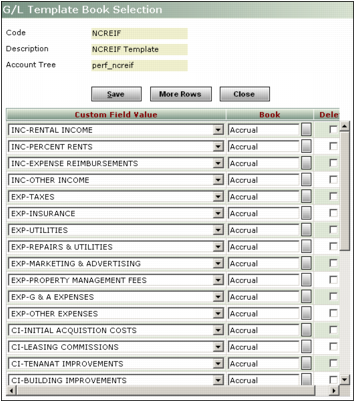
Click Save. Voyager adds the Book column to the data grid and automatically completes each row with a book type of Accrual.
|
|
8
|
If you want to change the book type in the Book column:
|
|
a
|
|
b
|
|
|
If you want to select more than one book type for a custom field value, click More Rows. You must include one row for each book type. For example, if you keep both market and accrual books for a particular node, you would add an additional line for that node, selecting Market in the Book field.
|
|
c
|
Click Save.
|
|
d
|
|
1
|
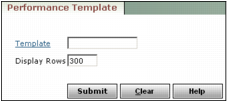
From the side menu, select Performance > Transfer From G/L > Add/Review Performance Template. The Performance Template filter appears.
|
|
2
|
In the Template field, type or select the template that you want to review.
|
|
3
|
|
a
|
Click Delete. A confirmation request appears.
|
|
b
|
Click OK.
|
|
a
|
Click Edit. The screen changes to edit mode.
|
|
b
|
|
c
|
Click Save.
|
|
1
|
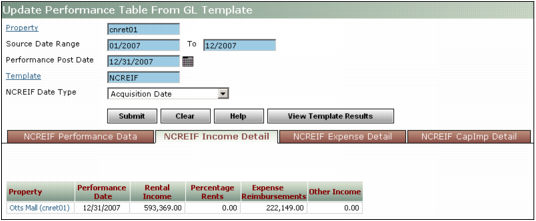
From the side menu, select Performance > Transfer from G/L > Transfer to Performance Table. The Update Performance Table From G/L Template screen appears.
|
|
|
For more information about equity rollup, see “Equity Rollups” in the Investment Management User's Guide.
|
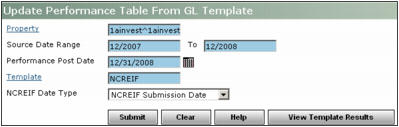
Property Type or select one or more property or entity codes.
Source Date Range -to- Type the range of dates for which you want to update the performance table. Voyager will search for all accounting data within the specified date range.
Performance Post Date Type the post date. When Voyager updates G/L data in the performance table, it includes this date.
|
|
Template Type or select the template that you want to use to update the performance table.
NCREIF Date Type Select the date after which you want to update performance tables. Options are:
Acquisition Date Voyager will update the performance table with data since the property purchase date.
NCREIF Submission Date Voyager will update the performance table with data since the quarter in which you began submitting data to NCREIF.
|
3
|
|
4
|
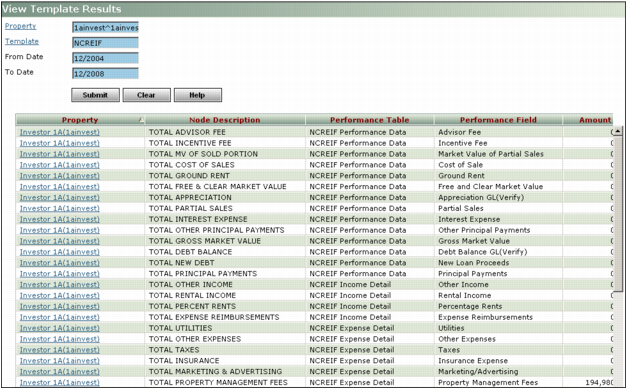
Click Submit. Voyager updates the selected performance tables and displays a tab for each performance table that was updated.
|